
NetSuite Basics: Key Features and Top 3 FAQs
Curious about NetSuite? Great! In this article, we break down NetSuite's basic features and answer the top three questions users ask. Dive in to see how NetSuite can streamline your operations and drive real results.
What is NetSuite?
NetSuite is a true cloud multi-tenancy Enterprise Resource Planning (ERP) solution designed to address your entire business. Being a true cloud solution, it can be securely accessed from any device that can operate a browser, anywhere, anytime, and being multi-tenant means every user is always accessing the same version of the system and regularly receiving updates automatically.
In NetSuite, financial, operational and transactional data from across the organization is displayed in real-time through customizable dashboards, reports and visual analytics, giving users a 360° view of the business and its performance at all times. By automating manual core business processes, NetSuite improves efficiency and allows organizations to save time and free up resources. Used by 37,000+ companies worldwide, it is the world’s leading cloud ERP system.
Essential NetSuite features
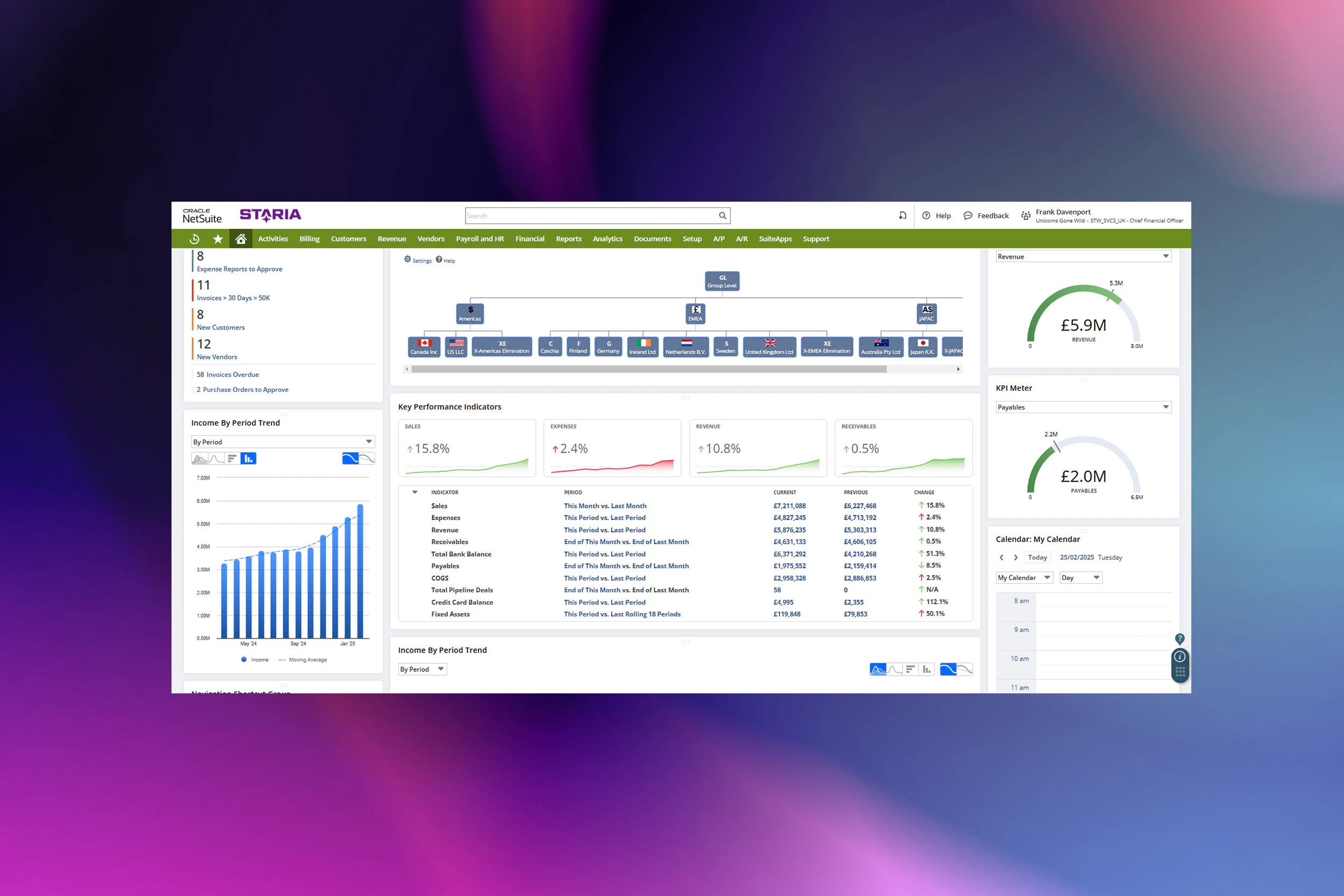
When logging in to NetSuite, users are met with a home dashboard that can be customized to display the metrics that the user finds most relevant. The system lets you drill down on and interact with any and all data shown in the dashboard. NetSuite is a role-based system, and users will have a role assigned to them which defines their permission levels in the system. NetSuite can be accessed on any device and works with all browsers.

The following features are examples of features that are relevant for most users:
Reminders: Track all the things that you want to keep in mind and follow up, including customized reminders. For example, a reminder could depict transactions that need to be approved by the user. NetSuite lets users deep-dive into the reminders straight from the dashboard.
KPIs: Standard KPIs can be leveraged from day one, and custom KPIs can be built when needed. KPIs can be analyzed and visually shown as lists, graphs, and snapshots on the home dashboard.
Multi-subsidiary view: Shows the structure of the company group and its different subsidiaries. Depending on the permission level of the user’s role, the user can navigate between seeing data for the whole company group, for a chosen region (Europe, for example), or a chosen subsidiary (in Germany, for example). NetSuite offers a multi-currency functionality and the figures of the whole group, different regions, and different subsidiaries placed in those regions can be displayed in different currencies.
Segments: NetSuite offers three default segments out-of-the-box: class, department, and location, which allows the user to drill down and analyze financial information and use it in reporting. There is also the possibility to add an unlimited number of custom segments based on specific customer requirements.
Customer and vendor data: Manage all your customer and vendor information and activities in one place, and track KPIs on dashboards related to a specific customer or vendor.
Ready to take the next step with NetSuite?
Our experts are here to help you get the most out of NetSuite. Whether you have questions about the system or want tailored advice, we’re just a click away.

Top 3 NetSuite Frequently Asked Questions
How much does NetSuite cost?
How much does NetSuite cost?
The cost of NetSuite largely comes down to two components: the cost of licences and the cost of implementing the system. Both costs are determined by the scope, which defines exactly what will be implemented and what NetSuite will be used for. The scope is typically defined and agreed between the buyer and system provider in the sales stages and used as a base to estimate the costs of licences and implementation.
How long does it take to implement NetSuite?
How long does it take to implement NetSuite?
The timeframe is also heavily reliant on defining the scope of the implementation project, with projects commonly lasting anything from 4 to 18 months. A phased approach with clear priorities allows for the most urgent problems and challenges to be addressed in the initial phase and the possibility to add additional project phases when needed to expand the solution.
Other that the scope, the timeline is also affected by variables such as resources on the customer’s side, the number of customisations requested, and the number of integrations needed with the customer’s current system landscape.
When is it a good time to do an ERP implementation project?
When is it a good time to do an ERP implementation project?
When is your business ready for an ERP system? The answer is – before you need one! Planning for an ERP system before the need for one is urgent allows the buyer to evaluate different systems, vendors, and partners, dedicate resources and align the project timeline optimally with other things happening in the company. In general, it’s advisable to do the project during a slower business period, so that internal resources can be committed to the project when needed.
How Staria can help with NetSuite
Thinking about implementing NetSuite or want to get more out of your current setup? Staria’s experts can guide you through every step—from planning and customization to ongoing support. Contact us to learn how we can help your business succeed with NetSuite.
The Complete Guide to ERP Implementation
Is your business considering adopting an ERP system?
ERP implementation goes beyond technology, it’s a fundamental shift in how you operate your business. It is also a big undertaking that requires focus, effort and resources.
In this guide we go through how to navigate a successful ERP implementation. It is based on our experience in hundreds of NetSuite implementations.
Start your ERP journeySubscribe
Join our monthly newsletter for valuable updates like blog posts, and upcoming events and webinars.